mirror of
https://github.com/ElegantLaTeX/ElegantBook.git
synced 2026-06-01 01:55:17 +08:00
本模板内置 5 组颜色主题,分别为 green、cyan、blue(默认)、gray、black,另外还有一个自定义的选项 nocolor。调用颜色主题 green 的方法为
\documentclass[green]{elegantbook} %or
\documentclass[color=green]{elegantbook}
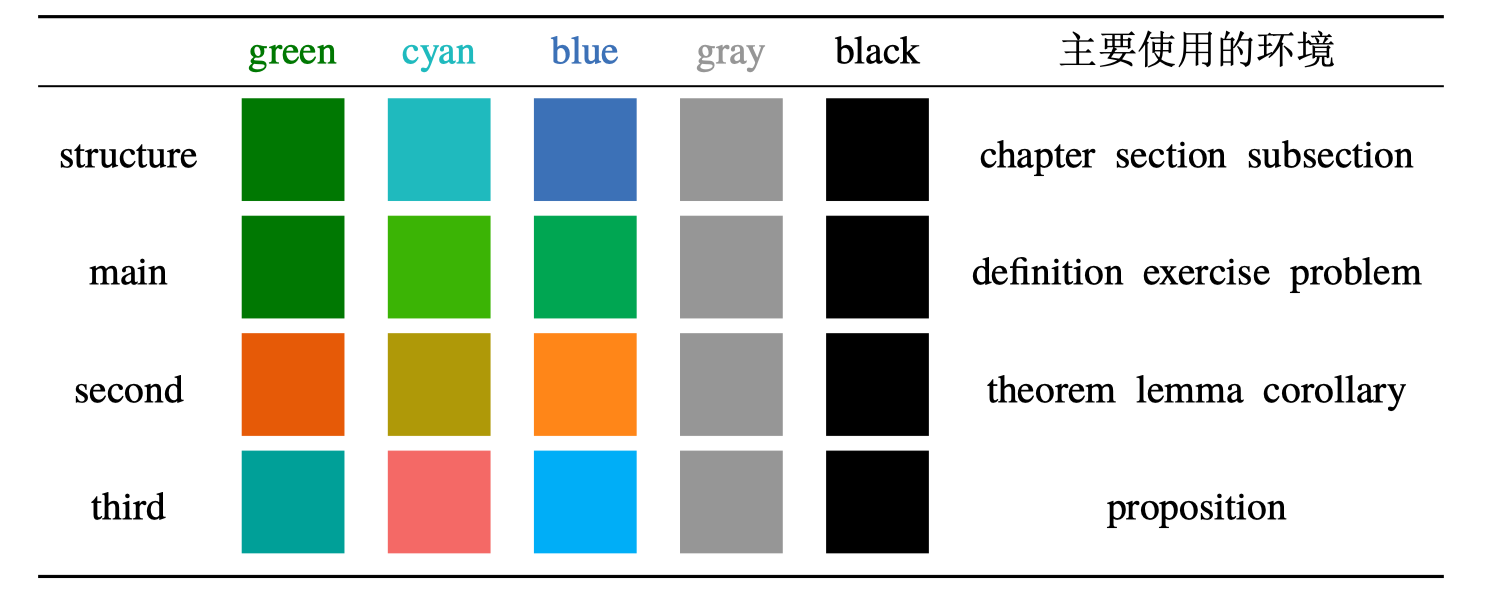
如果需要自定义颜色的话请选择 nocolor 选项或者使用 color=none,然后在导言区定义 structurecolor、main、second、third 颜色,具体方法如下:
\definecolor{structurecolor}{RGB}{0,0,0}
\definecolor{main}{RGB}{70,70,70}
\definecolor{second}{RGB}{115,45,2}
\definecolor{third}{RGB}{0,80,80}